 Luke Grimstrup
In our work, the approval moment has become one of the highest-leverage UX surfaces in an agentic product. It’s the moment the AI stops and asks you to decide.
That sounds like a small interaction. It isn’t. It’s where autonomy becomes accountable, where uncertainty becomes visible, and where you either get enough context to make a real decision or get reduced to a ceremonial “approve” button.
Agent products find it easy to over-index on autonomy demos. The agent opened the browser. The agent used tools. The agent changed files. The agent finished a workflow. All of that matters. But the durable design surface is the interrupt: what the system surfaces, how much context it carries, why it asks now, and when silence is the better answer.
By default approval asks for trust
The simplest approval surface says, in effect: “The AI is done. Approve?”
That prompt transfers responsibility to you without transferring understanding. It makes the reviewer reconstruct the task, hunt for the work that has changed, infer the risk, guess what will happen after approval, and work out whether “reject” means “try again,” “stop,” “escalate,” or “I need more information.”
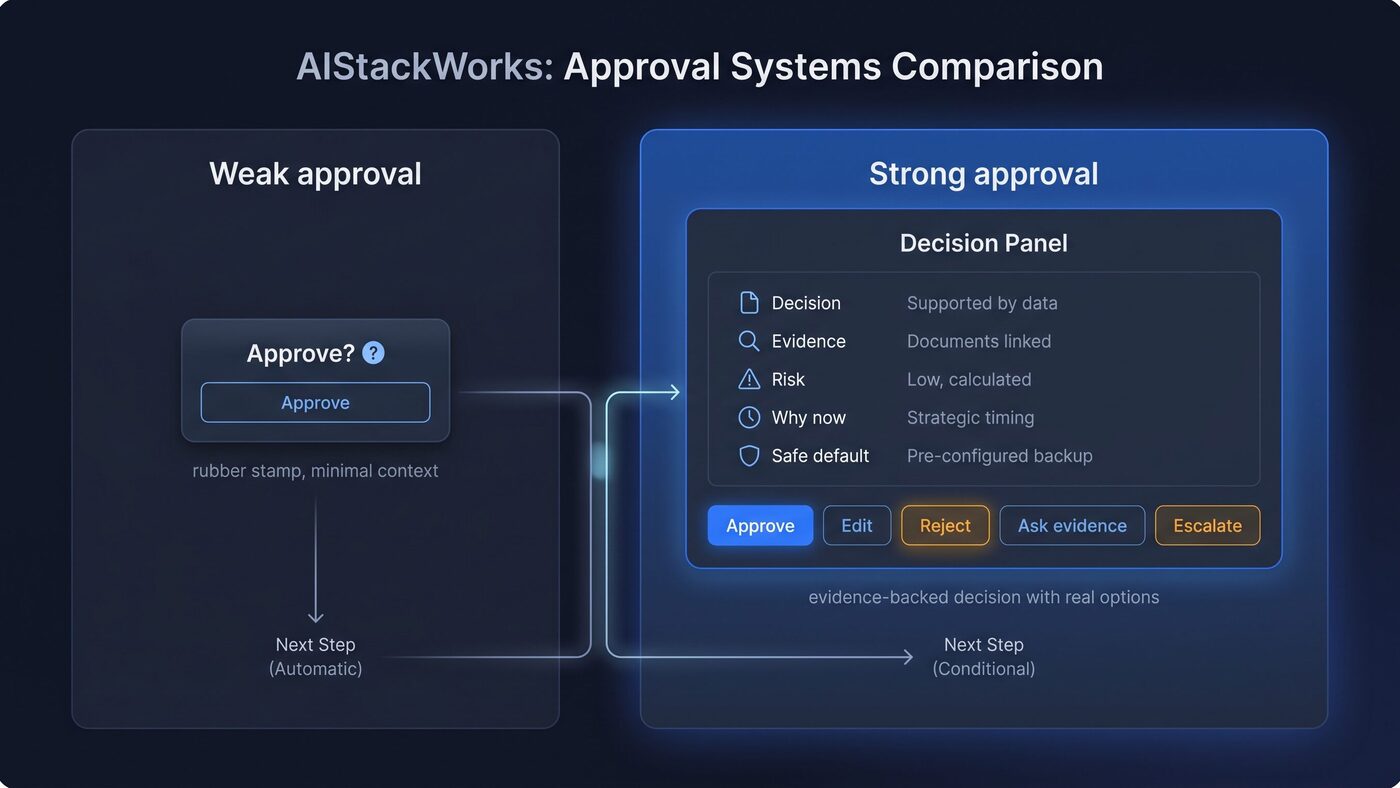
A weak approval asks the reviewer to trust the agent. A strong approval gives the reviewer a decision, evidence, risk context, timing, a safe default, and useful alternatives to yes/no.
That’s ceremonial oversight. AI systems should make clear what they can do and how well they can do it, show contextually relevant information, explain why the system acted, and support efficient dismissal or correction (Microsoft guidelines). A vague approval prompt violates those principles at the exact moment when they matter most.
A useful approval moment brings the decision into focus:
- What decision they are making.
- What evidence supports the recommendation.
- What risk or uncertainty remains.
- Why the system is asking now.
- What happens if they approve.
- What the safe default is.
- How to reject, edit, ask for more evidence, or escalate.
The difference is product-critical. “Approve?” asks for trust. A well-designed approval surface brings evidence.
In our own approval work, low-risk reviews got better once the review artifact stopped being just a status note. We built a demo-video-capture skill that recorded a demo video of the completed feature and attached it to the pull request and the work card. For visible, low-risk work, that artifact lets the reviewer inspect behavior instead of relying only on the agent’s claim.
For consequential work, treat that kind of evidence as one input alongside code review, tests, security review, data validation, production validation, and your judgment. Its job is narrower: making the review question clearer.
The product pattern is simple:
- Decision: “Approve this change to move forward?”
- Evidence: “Here is what changed, what passed, and what you can inspect.”
- Risk: “This is low-risk visible work; no migration, production data change, or irreversible external action is included.”
- Timing: “The system is asking now because approval would move the work to the next stage.”
- Default: “If unsure, request changes or escalate.”
- Reject path: “Tell the agent what evidence is missing or what should be corrected.”
That’s the approval moment doing its job.
The first approval often happens before the work starts
Agentic products tend to aim approval UX at the end of the task: the AI has done something, and now someone reviews the output. That’s only half the design problem.
As execution gets faster, the first important approval often moves earlier. The expensive failure shifts from implementation quality alone to fast execution against the wrong plan.
Claude Code’s common workflows include a plan mode where the tool can read and propose a plan before editing files (Claude workflows), and its best-practices guide recommends exploring first, then planning, then coding (Claude practices). That’s a design pattern for agentic systems: approve intent before allowing execution.
In our work, plan approval mattered more as agent execution got faster. We tried a fast, low-process model where loose meeting requirements could move straight into agent-assisted implementation. Alignment slipped, so we brought back team-wide planning and written plan signoff as the human-owned gate before build.
We have moved beyond “Plan Mode” in Claude Code, and moved the planning phase into AIStackWorks, so that the team has a chance to collaborate on the plan, and we can easily comment inline and make adjustments. This is now a core part of our workflow.
We found that the pre-build approval turns intent into a reviewable plan: goals, constraints, acceptance criteria, affected systems, known risks, are all known and agreed before the agent starts.
Tiny reversible changes can run on a lightweight plan (we often send bug fixes through an “Auto-Plan & Auto-Build” workflow). Consequential or ambiguous workflows need a more explicit checkpoint. When the agent is about to turn intent into action, you should be able to inspect that intent in a form they can approve, correct, or stop.
Too many approval moments can slow you down
Approval moments can become a fake safety layer.
Ask too often, and reviewers learn to click through, and can drift into learned helplessness. Ask too late, and you are forced to rubber-stamp work that’s already expensive to unwind. Ask with too little context, and you inherit accountability without receiving control. Pause routine, reversible, low-risk work, and human-in-the-loop becomes human-as-bottleneck.
Useful approval earns the interruption it creates.
Approval is meaningful only when you know what role you are playing, what evidence you need, what uncertainty remains, and what control you have.
Build more than one approval lane
A strong approval system has more than one lane.
On one project, migrations and larger changes stayed held for a more thorough review, while low-risk changes merged automatically after checks passed. The goal was to reserve interruption for moments where human judgment changes the outcome.
For product teams, that suggests a simple decision model:
- Stay silent for routine, reversible, low-risk actions that are already covered by checks and policy.
- Batch for review when individual interruptions would create more friction than value, but you still need periodic visibility.
- Interrupt now when the action is high-risk, ambiguous, irreversible, externally consequential, or missing evidence.
- Escalate or hand off when uncertainty remains unresolved, the evidence conflicts, the action is outside policy, or you must take ownership.
It matters because over-asking and under-asking both damage trust.
Sharp questions to ask during the approval step are:
- What’s the risk of being wrong?
- Is the action reversible?
- Is the evidence complete?
- Is the action internal or externally consequential?
- Would interrupting now improve judgment, or just add friction?
- Would batching preserve oversight without training rubber-stamping?
- Is this a case where the agent should stop and I should take over?
A mature approval UX routes different answers to different lanes.
Make rejection a useful input
Many approval surfaces treat rejection as failure. That’s a missed design opportunity.
A good rejection path asks what’s missing:
- “The evidence is insufficient.”
- “The plan solves the wrong problem.”
- “The risk tier is wrong.”
- “The changed artifact misses the request.”
- “Escalate before acting.”
- “Revise with this constraint.”
That turns rejection into structured feedback the system can use. It also protects from the worst version of oversight: being asked to say yes or no with no way to correct the underlying plan.
Where humans still own the system
The goal is fewer fake approvals and better judgment at the moments that count.
You and your team should still own the gates, the risk policy, escalation, and final accountability for consequential actions. The product’s job is to make that ownership real. That means showing enough context for a human to decide, preserving the ability to override or interrupt, and making escalation normal rather than exceptional.
The approval moment is where an agentic product tells the truth about its autonomy. If the system has evidence, it should show it. If it has uncertainty, it should name it. Routine and reversible actions can often continue without interruption. Consequential, ambiguous, or outside-policy actions should stop.
Design the run, but design the stop with even more care.
What you can do this week
This week, take the single approval prompt your product shows most often. Rewrite that one surface so it leads with the decision, links the changed artifact or plan, names the risk tier, explains why it asks now, and replaces a bare Reject button with “Tell the agent what evidence is missing.”
Use these questions while you rewrite the prompt:
- The decision a human is actually making.
- The evidence they need to make it.
- The risk or uncertainty that remains.
- Why the system is asking at this moment.
- What happens if the human approves.
- What the safe default is when the human is unsure.
- What reject, edit, ask-for-evidence, and escalation paths look like.
- Whether the system should ask now, batch the review, stay silent, or hand off.
You’ll know it worked when rejections come back with named missing evidence, concrete constraints, or a clear escalation reason instead of blank no’s, silent retries, or generic “try again” notes. If the product can’t produce that signal, it has a button instead of an approval moment.


